
About AssessConnect
AssessConnect is a secure and resilient “one-stop shop” for guaranty associations to manage member company contacts and perform assessment calculations for those states that chose to use it.
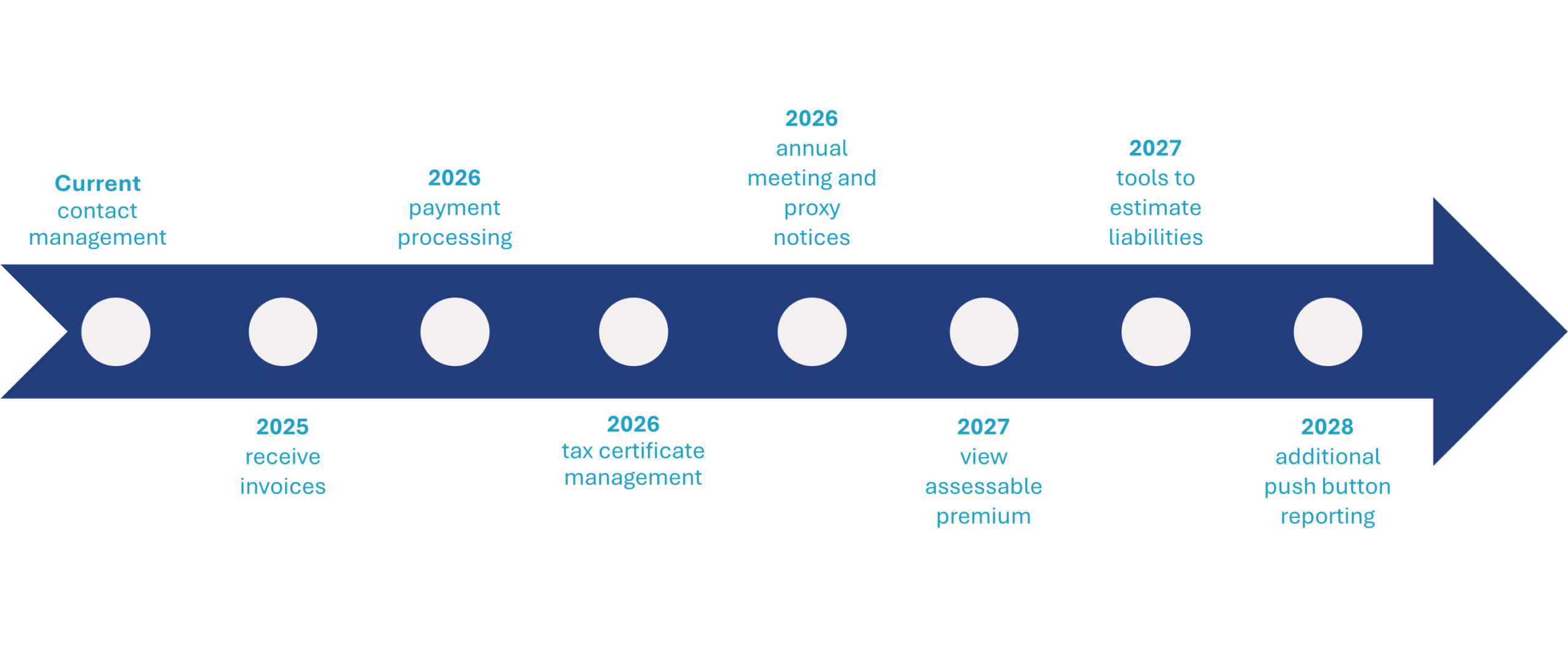
For companies, AssessConnect currently serves as a tool to instantly update contact information in almost every state. NOLHGA will unveil additional functionalities for companies over the next few years (see below).
If you have any questions about AssessConnect, please email [email protected].
How to Update Company Contact Information for Assessment Notices
Companies can go to www.assessconnect.com and update their contact information at any time by entering their company email address. No password is needed. A secure link will be sent to the entered email allowing the individual to view, add, or delete contacts associated with that company domain.
Here are a few tips for companies updating their contact information:
- Use shared mailboxes for all assessment communications whenever possible to avoid any messages getting lost.
- AssessConnect requires that there be at least one contact for (1) assessment notices; (2) tax notices; and (3) state Board communications such as proxy notices. That contact can be the same person/mailbox for all three categories, or multiple contacts may be listed.
- When a contact is added or deleted, it will be tracked and validated by email notice.
- If there are any issues logging into the system or questions about adding and deleting contacts, please email [email protected].
For a downloadable flyer on AssessConnect, click here.
Most state guaranty associations utilize AssessConnect for contact updates. For those that use a separate process, companies must reach out directly. Contact information for those states is below:
- Idaho: Candie Kinch – [email protected]
- Oregon: Candie Kinch – [email protected]
- Wisconsin: Report contact changes with company NAIC number to – [email protected]
- Wyoming: Candie Kinch – [email protected]
© 2001-2025 All Rights Reserved | Terms Of Use | Site Help