
About AssessConnect
AssessConnect is a secure and resilient “one-stop shop” for guaranty associations to manage member company contacts and life/health/annuity assessments for those states that chose to use it.
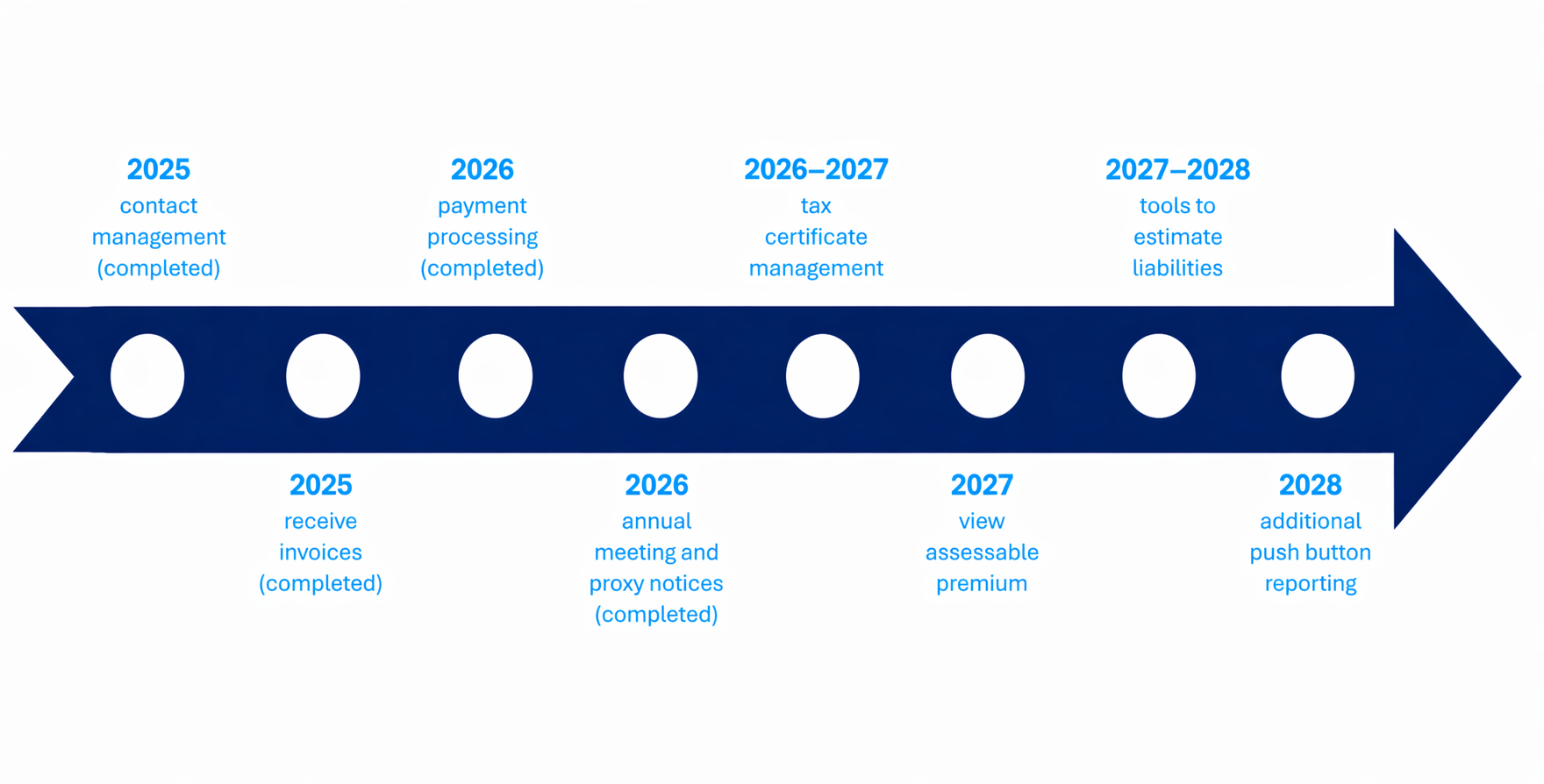
AssessConnect launched in 2025. Companies can update company contact information as well as view, download, and pay life/health/annuity assessment invoices in participating states. Additional functionalities for companies are planned in the coming years. Users can download FAQs about using AssessConnect by clicking here.
How to Update Company Contact Information
Currently, 45 states and the District of Columbia use AssessConnect to manage contact information for assessments. For those associations that use a separate process, companies must reach out directly. Contact information for those states is below:
- Alabama: Dotty Still ([email protected])
- Idaho: Candie Kinch ([email protected])
- Oregon: Candie Kinch ([email protected])
- Wisconsin: Report contact changes with company NAIC number to [email protected]
- Wyoming: Candie Kinch ([email protected])
Since April 2026, the NAIC quarterly financial statement filing process contains a “Guaranty Association Assessment Contact” field, which has been added to the electronic Jurat page. The information entered in this field will automatically populate NOLHGA’s universal company database, AssessConnect, streamlining updates for participating guaranty associations. The information added here serves as the PRIMARY CONTACT information for assessment notices.
To update your company’s information in AssessConnect, log into www.assessconnect.com. Click on the “My Organization” tab and then click on the “Add Contact” button. If there are multiple companies in your organization, click on “go to profile” to add contact information for a specific company. To delete a contact, click “View Contact.”
Here are a few tips for companies updating their contact information:
- Use shared mailboxes for all assessment communications whenever possible to avoid any messages getting lost.
- AssessConnect requires that there be at least one contact for (1) assessment notices; (2) tax notices; and (3) state Board communications such as proxy notices. That contact can be the same person/mailbox for all three categories, or multiple contacts may be listed.
- When a contact is added or deleted, it will be tracked and validated by email notice.
- Please be sure to delete any out-of-date or duplicate contacts as appropriate.
- If there are any issues logging into the system or questions about adding and deleting contacts, please email [email protected].
For a downloadable flyer on AssessConnect, click here.
How to View & Pay Assessments
The following guaranty associations use AssessConnect to manage their assessments: Alaska, Arizona, Arkansas, Connecticut, Delaware, District of Columbia, Florida, Georgia, Indiana, Iowa, Kansas, Kentucky, Maine, Maryland, Minnesota, Montana, Nebraska, New Jersey, New Mexico, North Carolina, Oklahoma, South Carolina, Texas, Washington, and West Virginia. As additional states “go live,” this list will be updated, and more information will be added as appropriate.
To review or pay a life/health/annuity assessment, log into www.assessconnect.com. To view all Assessments for your organization across all companies in the group, click the “Assessments” tab. You can then search for assessments by state, NAIC number, etc., and also view your organization’s payment status. You can also access an assessment for a single company by clicking on the “My Organization” tab and selecting “go to profile” for a specific company.
In either process, if you click on a specific assessment, you can view and download supporting calculations and invoices by using the relevant buttons. You can also pay via ACH in most states by clicking on the “Pay Now” button. If the Pay Now button is grayed out, this means the state does not participate in AssessConnect ACH payments.
Having trouble signing on?
No password is needed for a company to log into www.assessconnect.com; instead, a secure link process is used. Many companies have filters to block potentially malicious websites and emails. Depending on the types of security your company has in place, you may need to have www.assessconnect.com “whitelisted” to gain access and/or otherwise ensure that [email protected] can send you a “magic link” without triggering your SPAM filter. You may need to contact your company’s IT department for assistance.
If you get an error message that your company’s domain name is not recognized, email [email protected] to resolve the issue. AssessConnect uses company email domain names as part of its security validation process.
© 2001-2026 All Rights Reserved | Terms Of Use | Site Help